Download the template
Pick the format that suits how you plan. The Excel workbook is the one to type into: 14 days, with dates and totals worked out for you. The Word and PDF versions are for printing, with seven day pages. The CSV is the day-by-day plan alone.
- Excel workbook (.xlsx): four sheets (Trip overview, Day by day, Bookings and Budget). The Day by day sheet covers 14 days, its dates fill in from the start date you enter on the overview, and the Day by day, Bookings and Budget sheets total their costs.
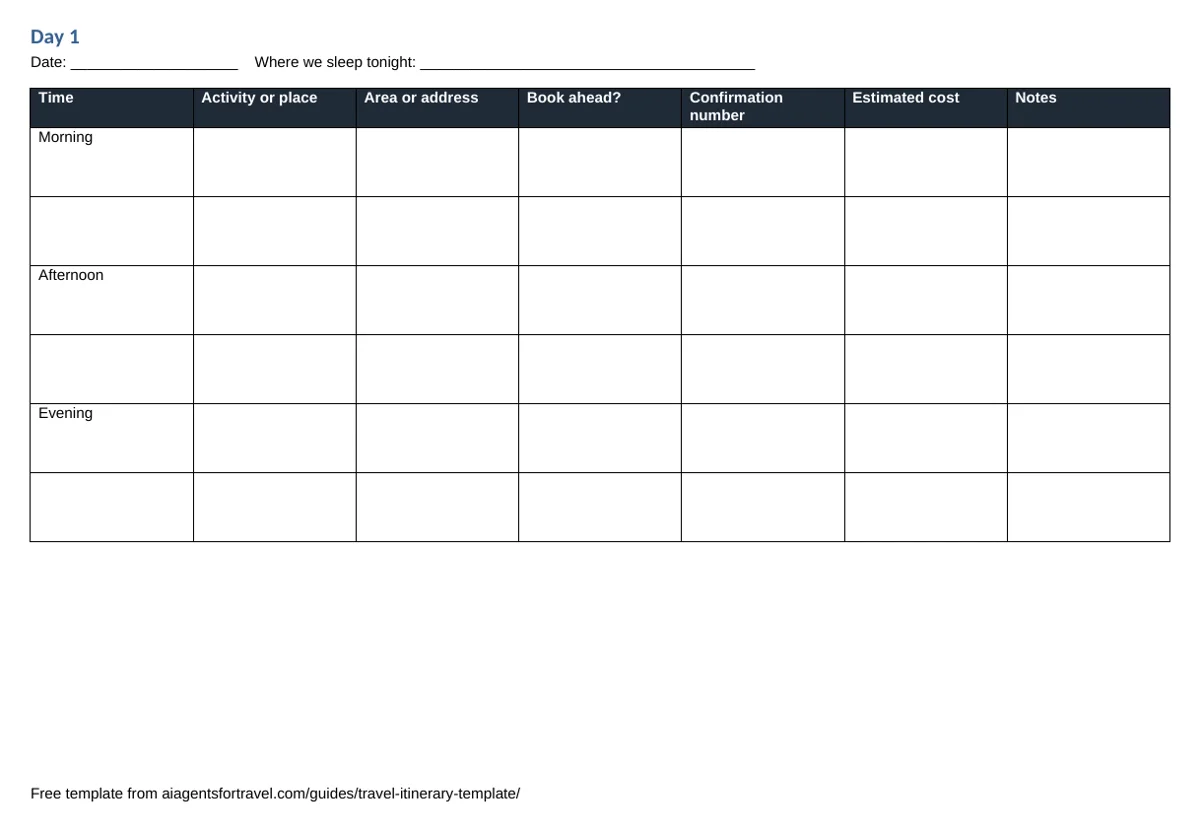
- Word document (.docx): an overview page, seven day pages, a bookings log and a budget page, in landscape A4. Copy a day page for a longer trip.
- Printable PDF: the Word version, ready to print and fill in by hand.
- CSV file (.csv): the 14-day plan with the same nine columns, for Google Sheets, Numbers or for pasting in an AI assistant's reply.
What is in the itinerary template
| Part | What you fill in | Why it is there |
|---|---|---|
| Trip overview | Trip name, destinations, start and end dates, travellers, where you stay, an emergency contact, your travel insurance policy and phone number | The facts you need in a hurry, on one page |
| Day by day | Day, date, time (morning, afternoon or evening), activity or place, area or address, whether to book ahead, confirmation number, estimated cost, notes; the printed pages put the day and date above the table | One row per part of the day keeps a plan realistic and shows which days are too full |
| Bookings | Type, what it is, the site or app you booked through, who provides it, confirmation number, from and to, free cancellation deadline and cost; the Excel sheet adds whether it is paid, and notes | The company you book through is often not the one whose change and refund rules apply |
| Budget | Planned and spent amounts for flights, stays, local transport, food and drink, tours and tickets, insurance and extras | The "left" column shows where the money is going while you travel |
The bookings log keeps two names for every booking: Booked through (the site or app you used) and Who provides it (the airline, hotel or operator). Many AI planners help you choose and then hand the booking to someone else. Mindtrip’s terms, for example, say it does not sell travel itself: bookings are made with booking partners, and the partner’s change, cancellation and refund rules apply. Writing down both names tells you who to contact when a plan changes. Which AI travel tools actually book? sorts every listed tool by who completes the booking.
Fill in the template with ChatGPT or Gemini
An assistant is good at the first draft: turning a few lines about your trip into a day-by-day plan that you then correct. The template’s columns give it a fixed shape to reply in.
- Write down the constraints. Dates, place, who is travelling, daily budget, how fast you like to move and anything you want to avoid.
- Ask for the template’s columns. Paste the prompt below and change the details. Asking for CSV with exact column names makes the reply line up with the Day by day sheet.
- Move the reply into the template. Paste the rows under the headings on the Day by day sheet, or save the reply as a .csv file and open it. If everything lands in one column, use your spreadsheet’s option to split text into columns, with a comma as the separator.
- Check before you book. Ask for links for opening hours, prices and seasonal closures, then open them yourself. An assistant can state an out-of-date detail as confidently as a current one.
- Keep the confirmations in the Bookings sheet as you book, with the name of the company that provides each one.
Prompt to copy
Plan 4 days in Lisbon from 23 May for two adults who like food and walking, budget about €150 a day each. Group each day by neighbourhood and keep travel between stops short. Reply only with CSV using exactly these columns: Day,Date,Time,Activity or place,Area or address,Book ahead?,Confirmation number,Estimated cost,Notes. Use Morning, Afternoon and Evening in the Time column, leave Confirmation number empty, and write “estimate” in Notes for any cost you did not check on the web.
This is an example to adapt, not a tested recipe. Both assistants have free plans. ChatGPT includes web search on its Free, Go, Plus and Pro plans, and how to plan a trip with ChatGPT has more prompts, from choosing a destination to packing. Google Gemini plans with Google Maps, Flights and Hotels data and groups an itinerary by neighbourhood; Google’s AI travel tools covers what its paid Task agent adds. ChatGPT vs Gemini for travel sets out what each assistant can book.
When a trip planner is the better fit
A template is yours: it works offline on paper, needs no account, and anyone you travel with can open it. A trip planner earns its place when you want a map, live prices, shared editing or confirmations pulled in for you. These planners from the catalogue keep an itinerary for you; costs are as the providers state them.
| Planner | What it does with your itinerary | Cost and platforms noted by the provider |
|---|---|---|
| Wonderplan | Builds an itinerary from your interests and budget; you can edit it and download it as a PDF | Free "at least for now"; web only |
| Wanderlog | AI suggests places and fills in itinerary days; collaboration and budgets; the App Store listing says the saved itinerary is stored offline | Free, with an optional Pro plan; Google Maps export and Gmail import need Pro, and Wanderlog does not say which AI help the free plan includes; web, iPhone and Android |
| Tripsy | Organises an itinerary; Smart Import pulls places and bookings from screenshots and links; a ChatGPT plugin and a Claude connector can create and update trips in your account | Free tier with unlimited trips; Smart Import needs Pro (US$59 a year on tripsy.app); no Android app |
| Stardrift | Builds itineraries around your calendar with live flight and hotel prices, and organises bookings from Gmail | Free on iOS, plus planning on the web |
| Mindtrip | Chat plus a map; turns suggestions into trip plans that a group can edit together | Free; web and iPhone |
| Layla | Drafts a day-by-day itinerary with hotels and experiences that you can change before booking | Planning is free, with no subscription or planning fee; web, iPhone and Android |
None of these were tested hands-on for this page; how we research explains how each listing is checked against the provider’s own pages, and the editorial policy covers what the site will and will not claim. Each profile also lists the tool’s limits and what its provider does not confirm. The guide to AI trip planners compares the full list by situation, and the guide to ChatGPT, Gemini and other assistants covers the general assistants.
Template or app: a quick way to decide
- Use the template for a single trip you will book piece by piece, a printed copy for the days without signal, or sharing a plan with someone who will not install an app.
- Use an assistant with the template when you want a fast first draft in a fixed shape, then your own checks.
- Use a planner app when you want the trip on a map, edited by a group, or filled in from your booking emails.
Common questions
Is this itinerary template free?
Yes. All four files download directly from this page with no sign-up and no email address, and you can copy, edit and print them for your own trips.
Can I use the itinerary template in Google Sheets?
Yes. Open the CSV file in Google Sheets for the day-by-day plan on its own, or upload the Excel workbook to keep all four sheets: trip overview, day by day, bookings and budget.
Can ChatGPT fill in an itinerary template?
It can draft one. Give ChatGPT your dates, place, budget and pace, and ask it to reply only in the template's nine columns as CSV. Treat the reply as a draft: ask for links for opening hours and prices, open them, and check the details before you book. How to plan a trip with ChatGPT has more prompts.
Which AI trip planners let you download or export an itinerary?
Among the listed planners, Wonderplan says you can download its itineraries as a PDF, and Wanderlog's App Store listing says exporting a trip to Google Maps needs its Pro plan. Google says Gemini's Task agent (formerly Spark) can build an itinerary document from your trip emails; Task needs a paid Google AI Pro or Ultra plan and is not available in every country, which Google's AI travel tools sets out.
Sources
- Searching the web with ChatGPT (OpenAI Help Center)help.openai.com, checked
- AI trip planner (Google Gemini)gemini.google, checked
- How Gemini plans trips (Google blog)blog.google, checked
- Task in Gemini (Gemini Apps Help)support.google.com, checked
- Wonderplanwonderplan.ai, checked
- Wanderlog Travel Planner (App Store)apps.apple.com, checked
- Wanderlog (Google Play)play.google.com, checked
- Wanderlog AI trip plannerwanderlog.com, checked
- Tripsy Protripsy.app, checked
- Tripsy in ChatGPTtripsy.app, checked
- Tripsy MCP servertripsy.app, checked
- Tripsy for Androidtripsy.app, checked
- Stardriftstardrift.ai, checked
- Stardrift: AI Travel Planner (App Store)apps.apple.com, checked
- Mindtripmindtrip.ai, checked
- Mindtrip: AI Travel Companion (App Store)apps.apple.com, checked
- Mindtrip terms of servicemindtrip.ai, checked
- Laylalayla.ai, checked
- Layla: AI Trip Planner (App Store)apps.apple.com, checked
- Layla (Google Play)play.google.com, checked